Free WH-347 Template for Excel and Google Sheets (2025 Form)
Short answer
Download the free WH-347 template, laid out like DOL's January 2025 form. You type the project, workers, daily hours, rates and deductions. Total hours, fringe credit, gross and net pay calculate, the statement boxes fill in, and each page prints on one landscape Letter sheet. No signup.
What's inside the WH-347 template
| Tab | What it holds |
|---|---|
| Start here | How to fill it in, in seven steps, plus the rules that trip people up. |
| Page 1 | The header (final payroll, prime or sub, project, payroll number, wage determination, week ending, business) and 8 worker entries, each with a straight-time and an overtime row, columns 1A to 9. |
| Page 2 | The Statement of Compliance with its six boxes, three apprenticeship program rows, the fringe benefit table (6 plans × 8 workers), remarks, signature, date, phone and email. |
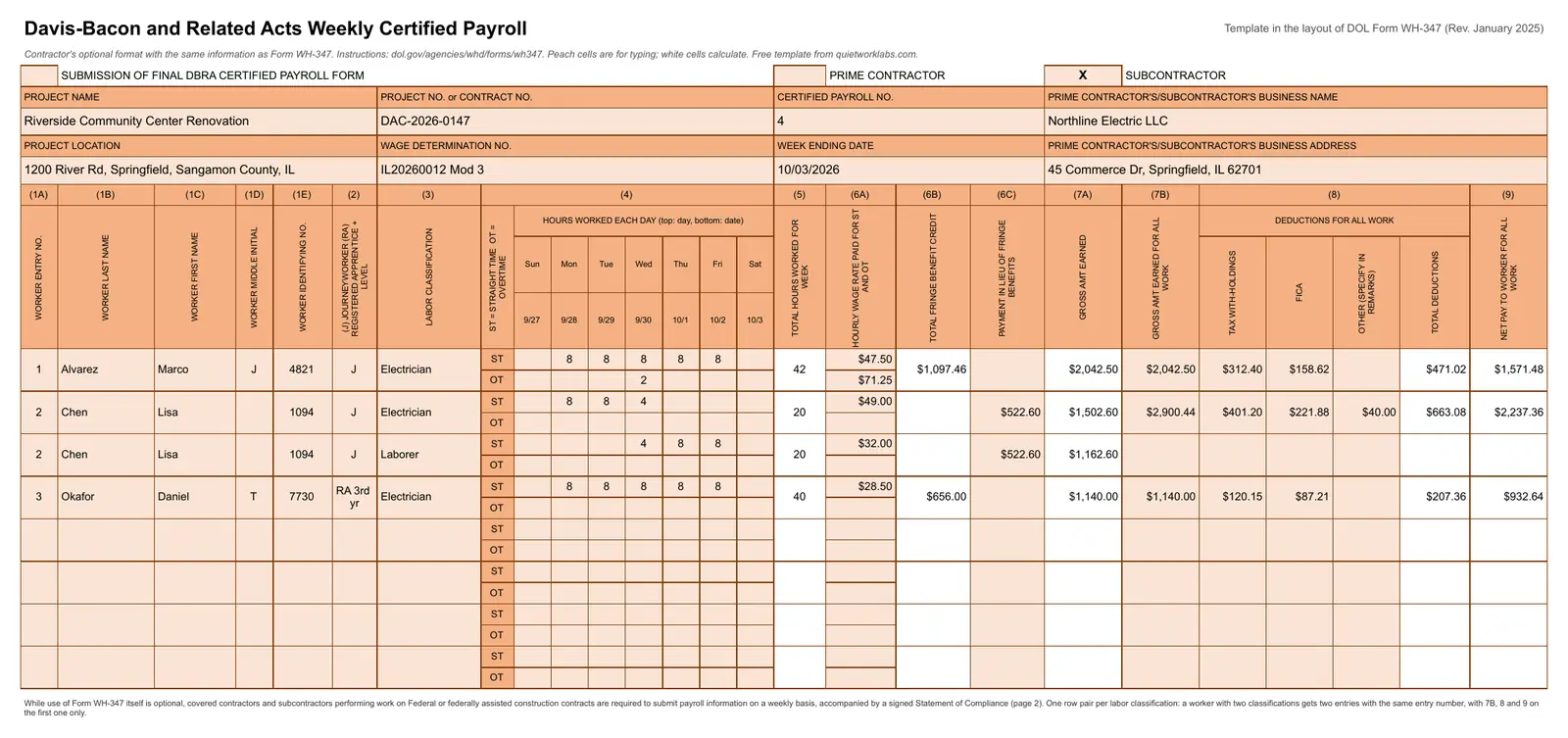
| Example page 1 and 2 | A filled payroll for a fictional electrical sub: overtime, a worker in two classifications, cash in lieu of fringe, three fringe plans and a registered apprentice. |
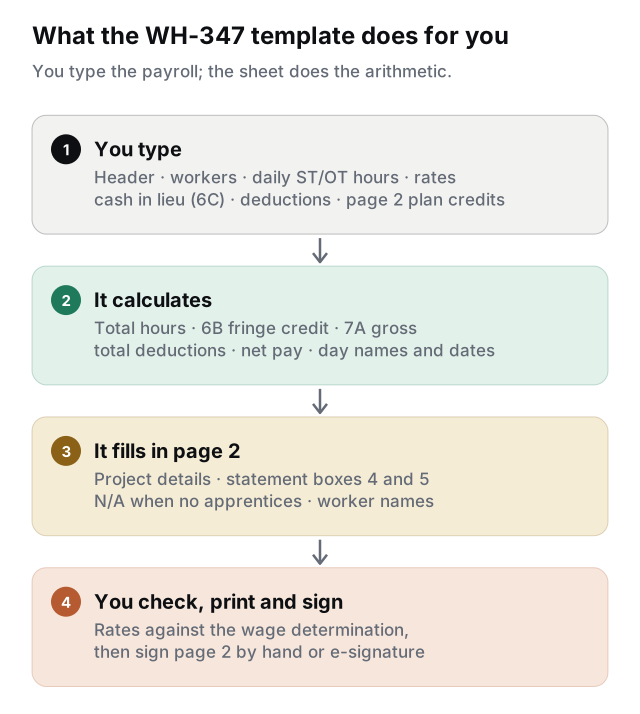
Peach cells are for typing; white cells calculate. The day names and dates across the top fill in from the week ending date, and page 2 copies the project details from page 1.
What calculates
| Column | Formula |
|---|---|
| (5) Total hours | Straight-time plus overtime hours for the entry |
| (6B) Total fringe benefit credit | Total hours × the worker's total hourly credit from the page 2 fringe table |
| (7A) Gross amount earned | Straight-time hours × straight-time rate + overtime hours × overtime rate + cash in lieu (6C) |
| (7B) Gross for all work | Copies 7A; type over it when the worker also earned money on other jobs that week |
| (8) Total deductions | Tax withholding + FICA + other |
| (9) Net pay for all work | 7B − total deductions |
| Page 2, boxes 4 and 5 | Box 4 ticks when any worker is marked RA, and "N/A" fills in under the program name when none is. Box 5 ticks when there's a fringe credit or cash in lieu. Boxes 1, 2, 3 and 6 are pre-ticked because they always apply. |
6C is typed as the week's total because the form has no column for the hourly amount: total hours × the hourly cash paid in lieu of fringe. In the example, 20 hours × $26.13 = $522.60.
Fill it in each week
- Header. Payroll numbers start at 1 for your first week on the project and go up by one each week you submit. List every wage determination (with its modification number) that applied to the work.
- One entry per worker and classification. A worker who did electrical work and laborer work in the same week gets two entries with the same entry number, each with its own hours and rate.
- Hours by day. Straight time on the ST row, overtime on the OT row. On contracts covered by the Contract Work Hours and Safety Standards Act, hours over 40 in the week are overtime, including hours worked off this project.
- Rates. 6A is the rate actually paid, without cash in lieu of fringe. Add the overtime rate on the OT row.
- Deductions. Enter what was actually deducted from the worker's total weekly pay; don't split deductions between jobs. Describe any "other" deduction in the remarks.
- Page 2. Enter the certifying official's name and title, apprenticeship programs (OA or SAA) and each worker's hourly credit per fringe plan.
- Print and sign. Sign page 2 by hand or with a legally valid electronic signature, then save a copy of the file for next week and change the week ending date, hours and payroll number.
Want every box explained? The WH-347 guide walks through both pages with the same example. For a week when nobody worked on the job, see when a no-work WH-347 is needed.
Rules the template can't check
- Wage determination rates. The template doesn't know the rates in your contract. For each classification, 6A plus the hourly fringe credit plus cash in lieu has to cover the basic rate plus fringe, in any mix. Overtime hours are owed that full amount plus half the basic rate (or half the cash rate, if you pay more). The prevailing wage calculator checks one worker at a time.
- Apprentice rates. Registered apprentices are paid from their program's wage schedule. Add the level of progression in column 2 (for example, RA 3rd yr).
- Unfunded plans. Taking credit for benefits you provide directly (an "unfunded plan") needs DOL's approval first, under 29 CFR 5.28.
- Other deductions. Apart from the deductions listed in 29 CFR 3.5, deductions need DOL's approval.
What it doesn't do
It's one project and one week per file, with 8 entries per page. Nothing carries over from week to week, so you retype the workers or copy last week's file. It doesn't compare pay with the wage determination, and it isn't an upload format for systems like LCPtracker. If your agency or prime requires one of those, use theirs.
When a template isn't enough
Filing for three projects every week means three files, three sets of retyped workers and no check that anyone was underpaid. Certified Payroll for Google Sheets keeps your workers, rates and hours in one sheet. For each project and week it checks the payroll against the wage determination, fills in the official DOL PDF and files it in Google Drive.
General information, not legal or payroll advice. The wage determination in your contract and DOL's WH-347 instructions are the authority, and you're responsible for the accuracy of each certified payroll you sign.
Sources
Frequently asked questions
Is this the official WH-347 form?+
No. It's a template in the WH-347 layout that collects the same information, with the Statement of Compliance worded exactly as DOL's page 2. DOL says using the WH-347 itself is optional: any format works if it has the required information and a signed statement with identical wording. The official fillable PDF is on DOL's WH-347 page.
Does it work in Google Sheets?+
Yes. Use the Copy to Google Sheets button for your own copy, or upload the .xlsx to Google Drive and open it with Google Sheets. The formulas, dropdowns and print layout carry over.
What if I have more than 8 workers?+
Like the form, each page holds 8 entries. Save a second copy for entries 9 to 16 (DOL numbers them on from 9) and submit both. Certified Payroll for Google Sheets adds pages automatically.
Can I put the full Social Security number in column 1E?+
No. DOL's instructions say full Social Security numbers must not be included. Use the last four digits or another number unique to the worker.
Do I submit a WH-347 for a week with no work?+
The federal rule covers each week in which contract work is performed. Some agencies and prime contractors also want a "no work performed" payroll for the weeks in between; if yours does, fill in the header, write it in the remarks and sign page 2.
Can I sign it electronically?+
Yes, with a legally valid electronic signature: an electronic process that shows acceptance of the payroll and verifies who signed it. Photocopied or scanned signatures don't count.