Certified Payroll · Google Sheets
This week's WH-347s, in one click.
Project name
Riverside Community Center
Week ending
10/03/2026
Payroll no.
4
| 1A | Worker | 2 | Class | Hrs | 7A gross |
|---|---|---|---|---|---|
| 1 | Alvarez, M | J | Electrician | 42 | $2,042.50 |
| 2 | Chen, L | J | Electrician | 20 | $1,502.60 |
| 2 | Chen, L | J | Laborer | 20 | $1,162.60 |
| 3 | Okafor, D | RA | Electrician | 40 | $1,140.00 |
Create WH-347 · week ending Oct 3
- ✓Rates · all at or above the wage determination
- ✓Fringe · credit + cash cover the fringe rate
- !Okafor · check the apprentice rate against the program
- ✓Saved · WH-347 #4 · 2026-10-03.pdf → Drive
How it works
Set up once, then a few minutes a week.
- Step 1
Buy
Checkout takes a minute. Your copy link, license key and setup guide arrive by email straight away.
- Step 2
Set up once
Make a copy, then add your business, projects, wage determination rates, workers and fringe plans. They carry over every week.
- Step 3
Enter the week
One row per worker and classification on the Time tab: daily straight-time and overtime hours. Deductions go on the Pay tab.
- Step 4
Check, then create
Certified Payroll › Create WH-347 checks the payroll, then saves the filled-in PDF to Drive and logs it. Sign page 2 and submit.
Inside the sheet
What you'll actually use.

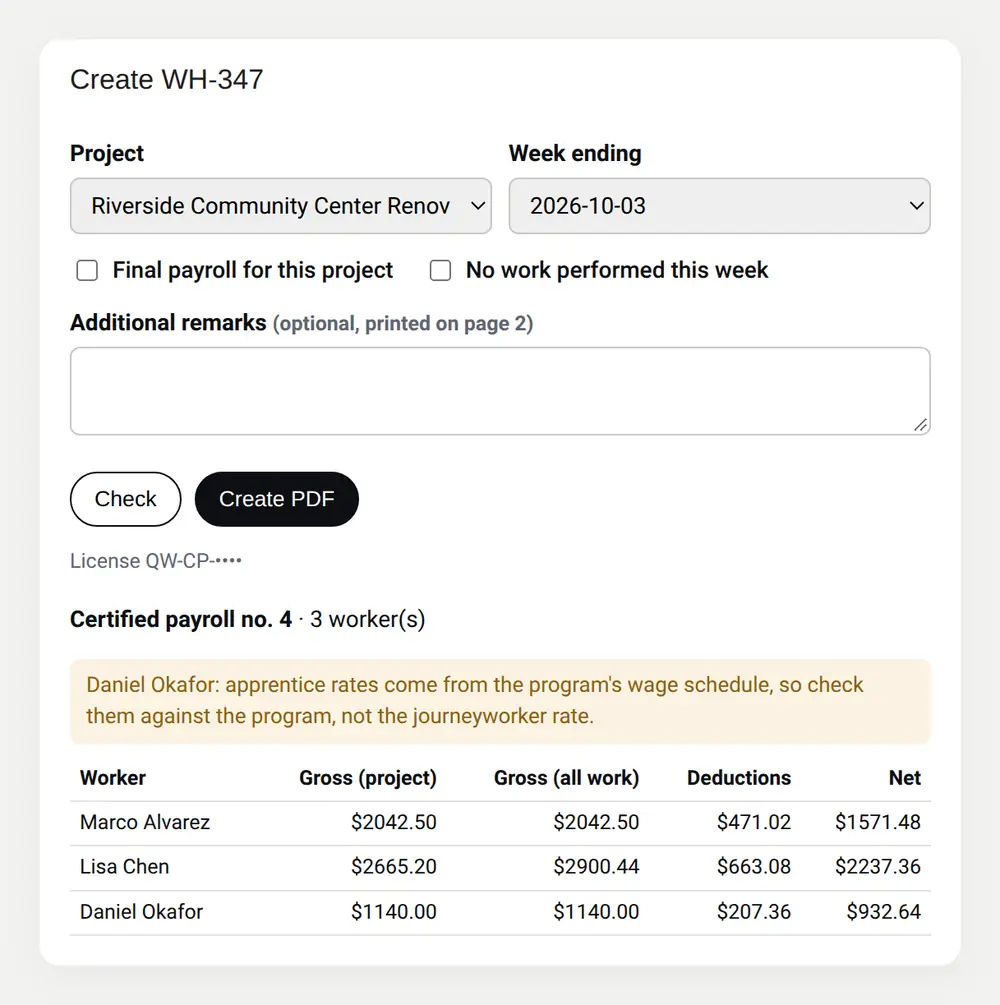
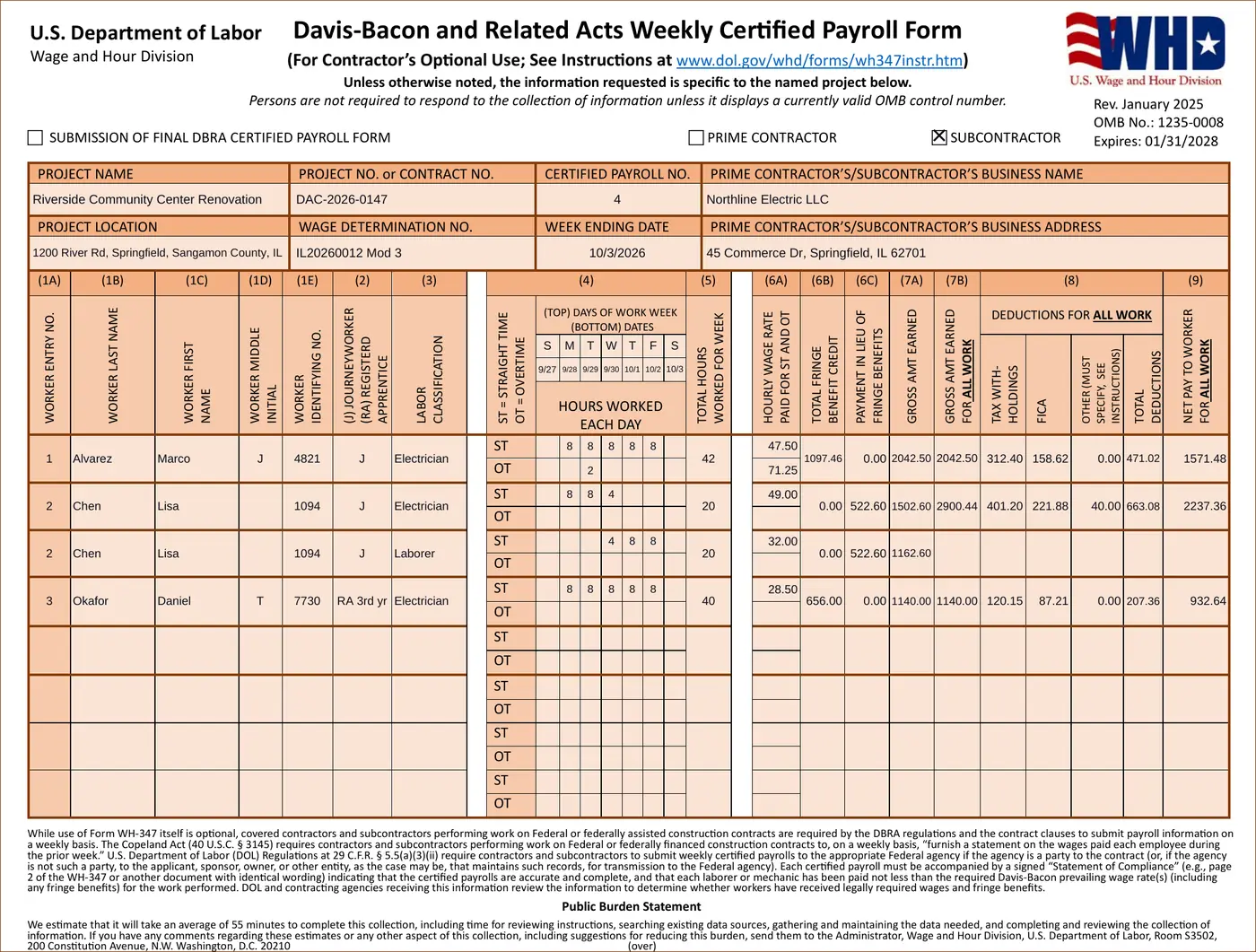
Screenshots use the sample payroll that comes in every copy.
Checked before every PDF
- Rate plus fringe credit plus cash in lieu below the wage determination's basic plus fringe
- Overtime below the rate owed: the full hourly package plus half the basic rate (or of the rate actually paid, if higher)
- Over 40 hours in a week with no overtime
- A full Social Security number where only the last 4 belong
- Registered apprentices without a program, or without OA/SAA
- Missing project, wage determination or certifying official details
- Deductions larger than gross pay, or an "other" deduction with no description
Errors stop the PDF until you fix them in the sheet. Warnings, like an apprentice rate to check against the program's wage schedule, are shown but don't block it. Try the same rules on one worker with the free prevailing wage calculator.
Filing one project a week? The free WH-347 template may be all you need.
Certified Payroll for Google Sheets
$59$79one-timeLaunch price
- ✓ Unlimited projects, workers and weeks
- ✓ The official WH-347 (Rev. January 2025) PDF, filled in
- ✓ Multiple classifications, apprentices, fringe plans, cash in lieu
- ✓ Final payroll and no-work weeks
- ✓ PDFs filed in Drive by project, with a log
- ✓ Free updates to this version
- ✓ Email support
All sales final. Try the free version first. Terms of sale
Questions
Is it the official DOL form?+
Yes. It fills in DOL's own blank WH-347 PDF (Rev. January 2025, OMB 1235-0008), both pages, adding pages when you have more than 8 entries or fringe workers. Page 2 lists your apprenticeship programs and fringe plans, with boxes 1, 2, 3 and 6 ticked and boxes 4 and 5 ticked when they apply.
What's sent to your server?+
Your workers, rates and history stay in your copy of the sheet. When you press Check or Create PDF, that one project-week (names, worker ID numbers, hours, rates and deductions) is sent over HTTPS to quietworklabs.com, which checks it and fills in the PDF. It isn't stored; we log only counts, like how many workers were on the form. The PDF is saved in your Google Drive.
Why does Google ask me to approve access?+
The script inside your copy needs permission to read and update that spreadsheet, show its dialog, connect to quietworklabs.com to build the PDF, and save PDFs to your Drive. The Drive permission covers only files the script creates. The setup guide walks you through the approval screen.
Does it calculate taxes or run payroll?+
No. You enter the withholding, FICA and other deductions your payroll already made, or the net actually paid. It produces the certified payroll report, not the paychecks.
How do I sign it?+
Print page 2 and sign it, or sign the PDF with a legally valid electronic signature. DOL doesn't accept photocopied or scanned signatures.
Does it work with LCPtracker, eMars or state forms?+
Not yet. It produces the federal WH-347 PDF, which many agencies accept. If your agency requires an upload format or a state form, email us which one.
Can I get a refund?+
It's delivered instantly and can't be returned, so all sales are final. Try the free WH-347 template first. If something doesn't work as described, email us and we'll fix it.
Questions before you buy? Email us. General information, not legal or payroll advice: you remain responsible for the accuracy of each certified payroll you sign.