AppFolio + Claude or ChatGPT: Realm-X Connector vs. a Custom AI Setup
Short answer
In June 2026 AppFolio announced a connector between its Realm-X AI suite and Anthropic's Claude, so property managers can run AppFolio work from inside Claude. It's listed in Claude's connectors directory, made by AppFolio, and you sign in with your AppFolio account; since September 2026 it comes with every AppFolio plan. We couldn't find an official AppFolio app for ChatGPT or Gemini. If the official connector covers what you need, use it; a custom setup makes sense when you need other data alongside AppFolio, a different AI tool, or your own history.
What Realm-X is
Realm-X is AppFolio's built-in AI. Its site describes several parts: the Assistant for ad hoc tasks like reports and drafting messages, Messages for resident communication, Flows for workflow automation, and Performers that handle leasing and maintenance tasks. AppFolio's pricing page lists the Assistant and Messages on Core and Flows on Plus.
In September 2026 AppFolio released a new Realm-X with memory of earlier conversations, a knowledge base of your documents and policies, shareable "Skills" (repeatable prompts), and dashboards and Flows built from a plain-language prompt.
The Claude connector doesn't replace any of that. It lets Claude hand work to Realm-X from outside AppFolio.
What the Claude connector does
According to AppFolio, the connector lets property managers trigger and run operational work in Claude, governed by AppFolio's own accounting rules, permissions and guardrails. AppFolio describes it as agent-to-agent: Claude and Realm-X work together directly, rather than Claude pulling a copy of your data. Examples AppFolio gives:
- Portfolio reporting that combines AppFolio data with outside market research
- Reviewing listings and analyzing occupancy trends
- Spotting maintenance bottlenecks
- Leasing optimization
- Accounting reconciliation
- Resident satisfaction analysis
Because the work runs through AppFolio, a user can only do what their AppFolio role already allows, and the actions stay visible in AppFolio.
How to get it
AppFolio announced the connector on June 9, 2026 and showed it at the National Apartment Association's Apartmentalize conference that month. It's listed in Claude's connectors directory as AppFolio Realm-X, made by AppFolio:
- In Claude, open the connectors directory and find AppFolio Realm-X.
- Add it, then sign in with your AppFolio account when prompted.
- Start with a read-only question about your portfolio to check it's working.
The listing says your AppFolio user permissions govern everything the connector does. AppFolio's September 2026 announcement says the new Realm-X, including the connector for Claude, is available with all AppFolio plans; neither page says which Claude plans it needs. If sign-in doesn't work for your account, ask your AppFolio account manager.
Before you rely on it
- Check numbers against AppFolio reports for the first few weeks. AI summaries can be wrong in ways that look right.
- Start with questions, then move to actions. Reporting and analysis are low risk; anything that changes records or money deserves a person reviewing it first.
- Mind who has access. Everyone who connects Claude to AppFolio works within their own AppFolio role, so review roles before rolling it out widely.
Official connector vs. a custom setup
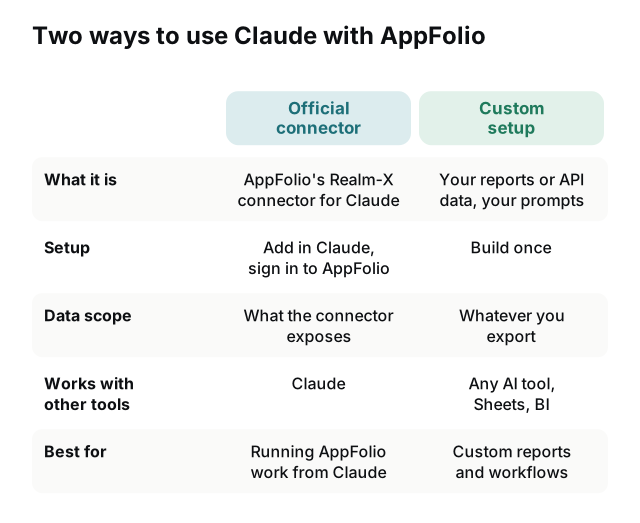
A custom setup makes sense when:
- You need more than AppFolio's data, e.g. QuickBooks, a maintenance vendor portal, spreadsheets, your CRM or market data, answered together.
- Your team uses ChatGPT, Gemini or Copilot rather than Claude.
- You want history: trends from daily snapshots, not just the current state.
- You want a narrow, safe tool: a delinquency assistant for one team that can't see anything else.
- The connector isn't available on your AppFolio or Claude plan.
ChatGPT, MCP servers and other AI tools
MCP (Model Context Protocol) is an open standard for connecting AI assistants to tools and data. Claude supports it, and OpenAI's Apps SDK for ChatGPT is built on it too. That means one well-built tool layer over your AppFolio data can serve more than one assistant.
AppFolio's own MCP server: the Realm-X connector is a remote MCP server at mcp.appfolio.com, which is how Claude connects to it. ChatGPT: we couldn't find an official AppFolio app in ChatGPT at the time of writing. Community MCP servers: some exist, and some work by logging into AppFolio's web interface with your credentials. Before connecting one, check how it gets data, where your credentials are stored, and whether it can write as well as read.
Gemini and AppFolio
AppFolio's announcements and its connector listing name only Claude, and we couldn't find an AppFolio app for Google's Gemini. Gemini can still work with your AppFolio data in two ways:
- Gemini in Google Sheets. With your AppFolio reports in a sheet, Gemini's side panel can analyze them: answer questions about the data, find trends and build charts. It needs an eligible Google Workspace or Google AI plan.
- A custom MCP server. The Gemini app connects custom MCP servers under Settings › Connected Apps, but for now only from a personal Google account, for users 18 or over in the US with Keep Activity on; work and school accounts can't. Companies on Gemini Enterprise can add their own MCP server as a data source.
For most property management teams on Google Workspace, the Sheets route works today. A sheet with a daily history of each report is what lets Gemini answer trend questions; RentOps Sheets Sync builds that from your AppFolio scheduled reports.
How a custom setup works
- AppFolio data flows out on a schedule, from report exports or the API if your plan has it.
- It lands in a database or spreadsheet you own, cleaned and snapshotted, with tenant personal data masked where possible.
- The AI connects to that data through a small, read-only tool layer: an MCP server for Claude or ChatGPT, or a connector for other assistants.
- Every question and answer is logged.
For a small team, the first two steps alone go a long way: an AI assistant can analyze an exported CSV or a sheet of daily snapshots without any custom tooling.
Questions worth asking your data
- "Which properties had the biggest increase in 30+ day delinquency this month, and which tenants drove it?"
- "List work orders open more than 14 days, grouped by vendor, with the oldest first."
- "Which leases expire in the next 90 days without a renewal offer sent?"
- "How has occupancy trended at each property over the last six months?"
Questions about trends need history, so check that whatever you connect has it: AppFolio's own historical reports, or a sheet of daily snapshots.
Security checklist
- Read-only by default. Write actions only with an explicit approval step.
- Least-privilege credentials created for the integration, never a person's login.
- No tenant SSNs, bank details or screening data in the AI's reach.
- Your data stays in accounts you control.
- Check your AI plan's data retention and training settings before sharing tenant data.
Need a clean data source first? RentOps Sheets Sync keeps a daily history of your AppFolio reports in Google Sheets, ready to export or connect to the AI tool you use.
We're not affiliated with AppFolio, Anthropic, OpenAI or Google; product names are trademarks of their owners. Connector details are from AppFolio's announcements as of this guide's update date.
Sources
- AppFolio newsroom: AppFolio connects Realm-X to Anthropic's Claude (June 9, 2026)
- AppFolio blog: Realm-X and Claude, agent-to-agent
- Claude connectors directory: AppFolio Realm-X
- HousingWire: AppFolio launches connector for Realm-X and Claude
- AppFolio: Realm-X
- AppFolio: the new Realm-X, on all plans (September 29, 2026)
- Model Context Protocol (MCP)
- OpenAI: apps in ChatGPT and the Apps SDK
- Gemini Apps Help: connect and manage custom apps
- Google Cloud: custom MCP server in Gemini Enterprise
- Google Docs Editors Help: Gemini in Google Sheets
Frequently asked questions
Does AppFolio work with Claude?+
Yes. In June 2026 AppFolio announced a Realm-X connector for Claude that lets property managers trigger AppFolio work from Claude, within AppFolio's permissions and guardrails. It's listed in Claude's connectors directory; you add it in Claude and sign in with AppFolio.
What AI does AppFolio use?+
AppFolio's AI suite is called Realm-X. It includes the Realm-X Assistant, Messages for resident communication, Flows for workflow automation, and Performers for leasing and maintenance tasks.
Is there an AppFolio MCP server?+
Yes. AppFolio's official Realm-X connector is a remote MCP server at mcp.appfolio.com, listed in Claude's connectors directory. Community-built MCP servers and scrapers also exist; check how they get data and where your credentials go before connecting one.
Can ChatGPT connect to AppFolio?+
We couldn't find an official AppFolio app for ChatGPT at the time of writing. You can give ChatGPT access to your AppFolio data through a custom setup built on scheduled exports or the API.
Does AppFolio work with Gemini?+
Not officially: AppFolio's connector is for Claude, and we couldn't find an AppFolio app for Gemini. Gemini in Google Sheets can analyze AppFolio reports you keep in a sheet, and Gemini can connect custom MCP servers, from a personal Google account in the US or through Gemini Enterprise.
Is it safe to connect AI tools to property data?+
It can be, with the right setup: read-only access by default, only the fields the AI needs, tenant personal data excluded or masked, and logs of every question and action.