AppFolio Google Sheets Integration: 4 Ways to Connect Your Reports
Short answer
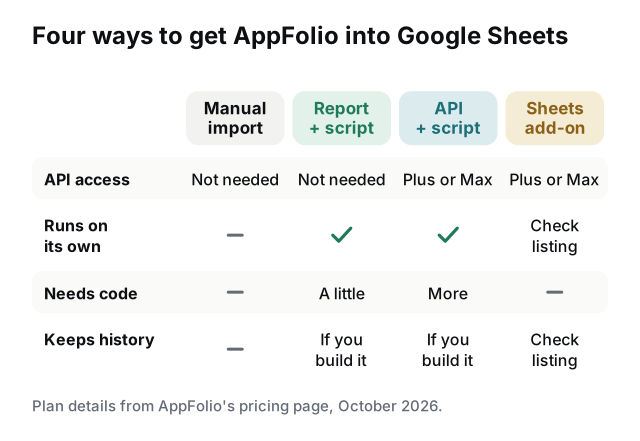
AppFolio doesn't have a built-in Google Sheets connector, but you can still keep a sheet filled with AppFolio data. Without touching the API, you can schedule a report as a CSV email and let a small Apps Script (or a no-code tool) copy each file into Sheets. On Plus or Max, which include the AppFolio API, a script or a third-party Sheets add-on can pull the data directly.
Is there an AppFolio Google Sheets integration?
Not from AppFolio. Its pricing page doesn't list Google Sheets among its features, and there's no "connect to Sheets" button inside AppFolio. What AppFolio does give you is a way to get data out: reports you can export, reports it can email on a schedule, and, on the Plus and Max plans, an API. Every working AppFolio Google Sheets setup is built on one of those three.
That gives you four practical routes, from a one-off import to a sheet that refreshes itself every morning.
Option 1: Export from AppFolio and import into Sheets
The quickest way, and fine for a one-off analysis:
- Open the report in AppFolio and set your properties, dates and columns.
- Choose Actions at the top of the report and export it as CSV.
- In Google Sheets, go to File → Import, upload the file and pick an import location.
- Choose Append rows to current sheet to add to a running history, or Replace current sheet to show only the latest copy. Leave the separator on Detect automatically.
If you append, add a date column first so you know which export each row came from. The weak point is obvious: someone has to do this every time, and the sheet is only as fresh as the last person who remembered.
Option 2: Scheduled reports into Sheets with Apps Script
This route doesn't need the API. AppFolio doesn't publish which plans include Scheduled Reports, so check that you see Reporting → Scheduled Reports in your account. AppFolio emails the report; Google Apps Script, the scripting tool built into Google Sheets, reads the email and writes the rows.
- In AppFolio, save the report with the columns you want. Then go to Reporting → Scheduled Reports → New Scheduled Report, pick the saved report, choose CSV as the format, add a recipient and a subject you can search for (e.g. "AF Daily Rent Roll"), and set a start date and frequency.
- Send it to the Google account that owns the sheet, ideally a shared mailbox such as
reports@yourcompany.comrather than one person's inbox. - In the sheet, open Extensions → Apps Script and add a function like the one below.
- Add a time-driven trigger so it runs every day, after the report usually arrives.
function importAppFolioReport() {
  const threads = GmailApp.search('subject:"AF Daily Rent Roll" newer_than:2d', 0, 1);
  if (!threads.length) return; // nothing new: add an alert here
  const msgs = threads[0].getMessages();
  const csv = msgs[msgs.length - 1].getAttachments()[0].getDataAsString();
  const rows = Utilities.parseCsv(csv);
  const today = new Date();
  const out = rows.slice(1).map((r) => [today].concat(r)); // snapshot date first
  if (!out.length) return; // header only: nothing to add
  const sheet = SpreadsheetApp.getActive().getSheetByName("Rent roll history");
  sheet.getRange(sheet.getLastRow() + 1, 1, out.length, out[0].length).setValues(out);
}
This is a starting point, not a finished tool. It doesn't check for duplicates, notice a missing email or handle a changed column layout. Two Google limits to know: a single run can last 6 minutes, and triggers get 90 minutes a day in total on a free Gmail account (6 hours on Google Workspace). A daily trigger set for 9 AM fires at some point between 9 and 10 AM, so schedule it with some slack after the report arrives.
Prefer no code? Zapier, Make and n8n can do the same job with a Gmail trigger and a Google Sheets action. Our AppFolio and Zapier guide walks through an example.
Option 3: The AppFolio API into Sheets
AppFolio's pricing page lists "AppFolio API (read only)" on Plus and "AppFolio API (read/write)" on Max. Core doesn't list API access. With credentials from your AppFolio admin, Apps Script's UrlFetchApp can call the API on a timer and write the response into a tab, with no email in between.
Good for: fresher data and larger portfolios. Watch for: API responses come back as JSON, so you'll write more code to turn them into rows than in option 2. Store the credentials in the script's properties, never in a cell. Our AppFolio API guide covers what each plan gets and how to request access.
Option 4: A Google Sheets add-on
The Google Workspace Marketplace has an AppFolio listing: the AppFolio to Sheets Connector by Elite Development Group. As of this guide's update date, the listing says it extracts report data "using your Property Manager Plus v1 API credentials", offers pre-built connectors for reports such as rent roll, delinquency, work orders and unit vacancy, and costs a one-time $14.99.
Three things to check before you install it:
- You need API credentials. That puts it out of reach on Core, and on Plus or Max you'll need your AppFolio admin to issue them.
- It's third-party. It comes from Elite Development Group, not AppFolio. Read the permissions it asks for, because your tenant and owner data passes through it.
- Refresh and history. The listing doesn't say whether it refreshes on a schedule or keeps past snapshots, so test that before you rely on it.
Which option fits your team
| Your situation | Best route |
|---|---|
| One-off analysis or a quarterly owner report | Manual export and File → Import |
| No API access, want a sheet that updates daily | Scheduled report and Apps Script (or Zapier, Make, n8n) |
| Plus or Max, someone comfortable with code | API and Apps Script |
| Plus or Max, no developer | A Marketplace add-on, or scheduled reports |
| You need trends over months (occupancy, delinquency) | Any automated route that appends a dated snapshot |
Before you build anything, check what AppFolio already does in-house. Its Winter 2024 product update added sorting, filtering and grouping to reports for all customers, plus pivot tables and charts on Plus and Max. If the goal is a chart someone looks at inside AppFolio, you may not need Sheets at all.
Getting the AppFolio sheet right
- Keep history, don't overwrite. A rent roll replaced every morning only shows today. Appended with a date, it shows occupancy and rent trends over months.
- Watch the number formats. Sheets can turn unit numbers like "0012" into 12 and misread negative amounts shown in parentheses. Check a few rows after the first import.
- Lock the saved report. If someone adds a column to the report in AppFolio, every row after that shifts. Keep automation reports separate from the ones people edit, or match columns by header name.
- Share carefully. Rent rolls and delinquency lists contain tenant names and balances. Share the sheet with named people, not "anyone with the link".
- Alert on silence. If the report email stops arriving, you want to hear about it, not find a stale sheet two weeks later.
If you'd rather land the same data in Excel or Power BI, the steps are similar; see automating AppFolio exports to Excel and Sheets.
Skip the script: let a tool do it
RentOps Sheets Sync is our ready-made version of option 2. It runs in your own Google account, imports any scheduled AppFolio CSV report into its own tab, keeps daily snapshots, skips duplicates when a report is re-sent, and emails alerts on rules you set. It uses scheduled reports, not the API, so it works on any plan where you can schedule reports, and the free Lite edition lets you check that first. It doesn't write anything back to AppFolio.
We're not affiliated with AppFolio, Google or Elite Development Group; AppFolio, Google Sheets and other product names are trademarks of their owners. Plan details and add-on pricing are from public pages as of this guide's update date, and menu labels can vary by AppFolio version.
Sources
- AppFolio: plans and pricing (API access, reporting and Realm-X by plan)
- Apartments.com help: setting up an AppFolio scheduled report (XLSX or CSV)
- Google Workspace Marketplace: AppFolio to Sheets Connector by Elite Development Group
- Google: import data sets into Google Sheets (File → Import options)
- Google: Apps Script quotas (6 min per run, trigger runtime per day)
- Google: Apps Script installable and time-driven triggers
- AppFolio: What's New, Winter 2024 (report sorting, filtering, pivot tables and charts)
Frequently asked questions
Can AppFolio connect to Google Sheets?+
Not with a built-in connector. Scheduled report emails plus an Apps Script or no-code automation keep a sheet updated without API access. On Plus and Max, the AppFolio API can fill a sheet directly.
Does AppFolio have an API?+
Yes, on some plans. AppFolio's pricing page lists the AppFolio API as read-only on Plus and read/write on Max. Core doesn't list API access, so Core customers rely on report exports and scheduled reports instead.
Is there a Google Sheets add-on for AppFolio?+
There's a third-party one: the AppFolio to Sheets Connector by Elite Development Group in the Google Workspace Marketplace. It needs AppFolio API credentials, so it suits Plus and Max customers. It's a third-party product, not AppFolio's.
Is AppFolio compatible with QuickBooks?+
AppFolio has its own accounting built in, and its pricing page doesn't list a QuickBooks integration. Teams that still need QuickBooks typically export reports from AppFolio as CSV and import them, often as journal entries.
What AI does AppFolio use?+
AppFolio's built-in AI is Realm-X. The pricing page lists the Realm-X Assistant and Messages on Core and Realm-X Flows, its workflow automation, on Plus. It works inside AppFolio rather than in Google Sheets.